
Care staff scheduling software pricing
One rate, published, no call required.
$20 a month, plus $1 per staff member per month. The same rate for every agency, with no minimum.
Three real agency sizes, worked out in full.
Every figure below is the whole monthly bill for the whole product — every location, every position, every scheduler, and a sign-in for every staff member. There is nothing left to add on to make it work.
| Agency | Base | Staff | Per month |
|---|---|---|---|
| Two homes, 12 staff | $20.00 | $12.00 | $32.00 |
| Five homes and a day program, 46 staff | $20.00 | $46.00 | $66.00 |
| Fourteen locations, two agencies, 120 staff | $20.00 | $120.00 | $140.00 |
The rate does not change with size and there is no volume negotiation to miss out on. A twelve-person agency pays the same $1 a head as a hundred-and-twenty-person one.
Which staff you are charged for, exactly.
Charged on the highest number of staff active at any point in the month. Not the number on the day the invoice runs, and not everyone who passed through.
Your bill follows your actual headcount. If someone leaves, they are gone from the next month — nothing to cancel and nobody to email.
Office staff who do not work shifts are free. An administrator or a scheduler who never appears on the roster is a login, not a staff member, and logins are not counted. People you have archived are not counted either, and neither is anyone on the schedule during your trial.
Your first invoice is prorated from the day you activate, so starting on the 20th does not cost you a full month. After that it is the calendar month, with the count and the math shown on your billing page — you can see the peak we used and check it against your own records.
What the price includes.
There is one product and everybody gets all of it. No edition to upgrade to, nothing held back for a bigger plan, and no feature that appears once you pass a headcount.
Everything below, for $20 plus $1 a head.
- One-click fill of a whole week — weighing position held, availability, hours already assigned, preferred hours, doubles and load, with a reason for anything it can’t fill
- Plain-English editing — type the change and see it before it happens
- Recurring master schedules — describe a one- or two-week pattern once and the next twelve weeks stay built from it
- Draft and publish, so staff never plan around a working copy
- Hard refusals on double-booking and hours caps someone agreed to — and approved time off is never scheduled over automatically, only by a supervisor confirming it with the dates named
- Overtime warnings against your own threshold, with projected hours
- Certification and licence expiry dates — record what somebody holds and when it runs out, and confirm before publishing a week where somebody's has lapsed. On to begin with, and you can switch it off. It does not verify a certificate, hold a copy of one, know what your state asks for, or chase a renewal
- Availability by day, understanding shifts that run past midnight
- Coverage at a glance — the open count, the thinnest day of the week, and which of your other homes is worse off
- A bonus on a hard-to-fill shift, shown to staff on the shift itself, and it stays attached after somebody takes it
- Unlimited locations, positions and position groups
- Unlimited schedulers and administrators
- A sign-in for every staff member, included
- Open shifts staff can claim, and hand-overs between staff
- Call-offs, late arrivals and no-shows recorded with the date and who entered them
- Printing by week, by location or by person
- Installs to a phone’s home screen, no app store, nothing to approve on a managed device
- Hours by person for a pay period, exported with your own payroll IDs, so a week does not get retyped into payroll
- Roster import from a spreadsheet — the template is built from your own homes and positions, and it previews all-or-nothing
- Schedulers you can narrow to certain homes, for a supervisor who runs one house rather than the agency
- Staff can ask for time off in the app, and a request never reads as approved until somebody approves it. Off until you switch it on
- Ninety days of attendance for any staff member, with who recorded each entry
- In-app help that changes with the role — a DSP and an administrator read different instructions, and neither reads yours
The bill goes up in a straight line.
There are no tiers to cross and nothing that steps up when you pass a headcount. The only number that moves is $1 for each person you schedule, so the rate per person actually falls as the $20 base spreads further.
Ten times the staff, four times the bill. Every figure is $20 plus $1 per scheduled staff member — the same arithmetic as the table above.
Most scheduling software in this sector charges per user, and asks you to book a call to find out the rate. Ours is on this page, and office staff who never work a shift are not counted at all.
Two optional extras. Neither is needed to run a schedule.
Reliability scoring is included in your trial at no cost, and scoring stays off until you switch it on. If you activate the account it adds $20 a month unless you decline it on the billing page. Messages is off until you ask us to switch it on. Both are listed here so there are no surprises on your bill.
| Add-on | What it does | Price |
|---|---|---|
| Reliability scoring | A rating out of 100 per staff member, built only from what a supervisor actually recorded — a late arrival, a call-off, a no-show. Optionally attach a bonus to holding a standard for three, six or twelve months. You choose whether schedulers see it, and separately whether staff see their own. | $20 a month, flat at any size |
| Messages |
Tell the right people about a shift instead of a group message half of them have
muted. Pick who hears it — by home, by position, by who has said they want
extra hours — and see exactly who that is, by name, before it sends. It
lands in each person’s inbox in the app, and buzzes their phone if they
have turned notifications on. They can reply.
Not SMS yet. This reaches staff who have the app on their phone. Text messaging, for people who never install it, is still to come. |
$1 per staff member per month. Free on your first 50 staff for founding agencies, for as long as the subscription stays active. Full terms |
Reliability scoring — how the number is worked out
It is built from what a supervisor already recorded on the schedule — a late arrival, a call-off, a no-show. There is nothing for staff to fill in and no clock to punch. Everyone starts at 100.
Not calling is the thing it weighs heaviest.
No call, no show
Called in — could not come
Lateness costs what it costs. An hour late is an hour the person before you had to stay, so it counts the same on a long shift as on a standard day. On a short shift it counts for more, because it is a bigger share of the cover. At the far end the two meet: arriving so late the shift is already over costs exactly what never arriving would.
It fades. Six months and an incident is gone.
100
one call-off three months — half its weight six months — gone
You decide who sees it, in two separate steps. Scoring can run with only administrators seeing the numbers; showing a person their own score is a second switch. Staff who can see it also see the events behind it, not just the number — a figure nobody can question is an argument waiting to happen.
Bonuses are optional, and you set the bar. Attach one to three, six or twelve months of either holding a standard you choose — checked on every day of that period, not just the last one — or a clean run with no incidents at the level you pick. A clean run is broken outright by one event, which is the difference between the two: an old incident stops mattering to the score long before it stops mattering to a streak.
Messages — what picking who hears it looks like
You choose the audience, and the app tells you who that is by name before anything sends. This is the part nobody expects: it is a count and a list, not a hopeful broadcast.
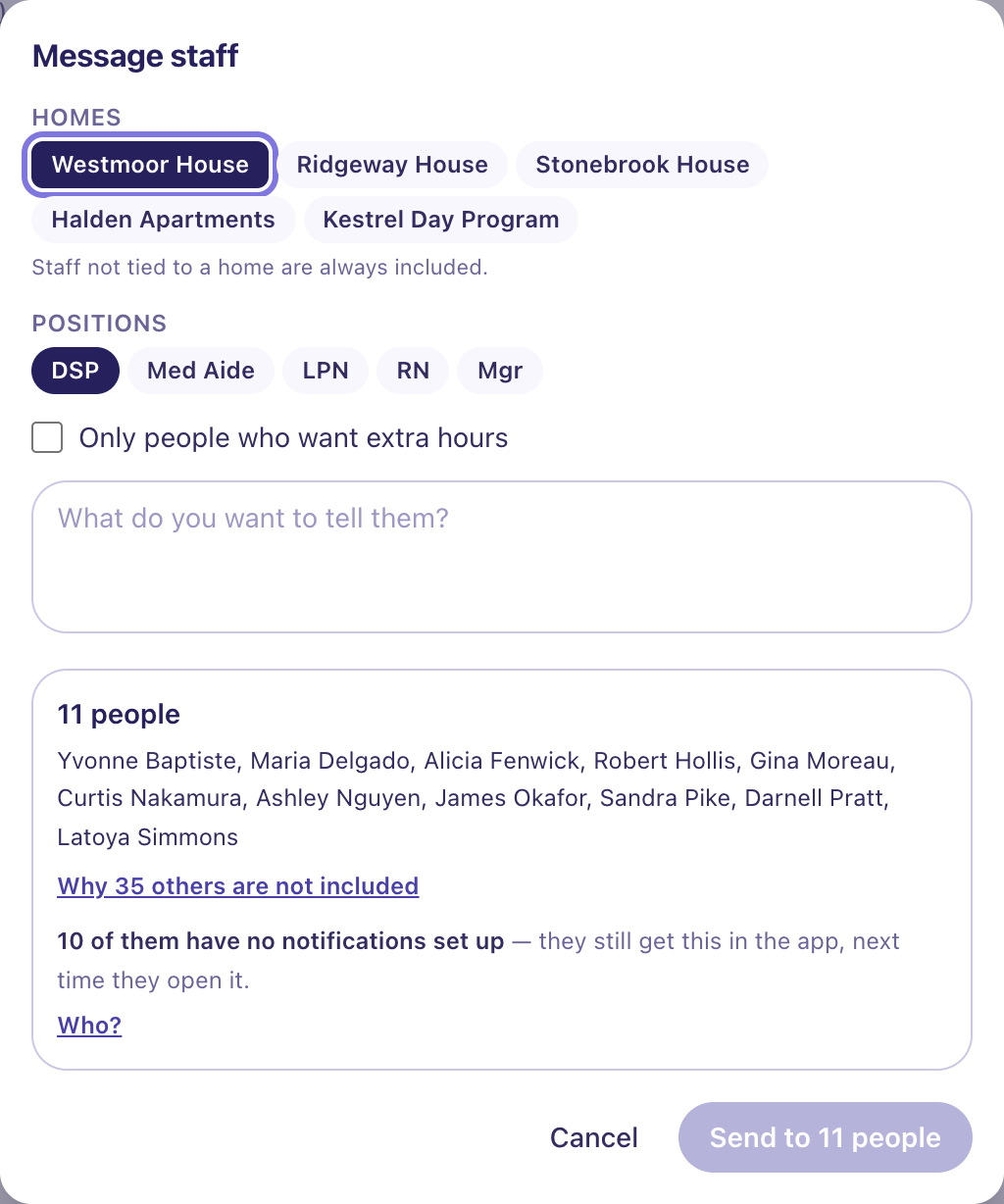
It lands in an inbox, not just a notification. The message is in the app for each person, and it buzzes the phone of anybody who has allowed notifications. Somebody who never turned notifications on still finds it. They can reply, and the thread is the record of what was said.
Two things to know about your first invoice. Your account is entitled to both add-ons from the day you sign up — reliability scoring and Messages — so you can use them during the trial. Scoring itself stays off until you switch it on: until then nobody is scored and no staff member sees a score.
A trial is never invoiced, so both cost nothing while you are in one. If you activate the account, reliability becomes a $20 a month line and Messages becomes $1 per staff member a month. Removing either is one click on your own billing page and the charge goes with it, and you can add it back later.
Fourteen days, the whole product, no card.
Your real schedule, real staff, every feature. Nothing to cancel, because there is nothing to cancel — we do not take a card to start.
When it ends, the schedule becomes read-only and shows the next three days. Nothing is deleted and nobody is locked out. A house needs to know who is working tonight whether or not we got paid.
Activate whenever you like, before or after the fourteen days are up, and it picks up exactly where it was.
Questions about the bill — the term, who counts as a staff member, how payment is collected — are answered on the full FAQ. Also worth reading: what staff get and what we do and don't hold.
Try it on this week.
Fourteen days, your real schedule, no card. Long enough to build a full week and print it for the wall.
Start a free trialQuestions first? sales@delegynshift.com